Skip to content

Learn more about Planniac's key features

Activities are the things you offer guests. Like tours, transfers, room extras or spa services. The Planniac system is built to help with that.

Read more  👉

Another area where Planniac shines. Share a link with your guests so they can have your hotel in their pocket and follow the itinerary you've prepared. Share that link from a scheduled Cloudbeds email, from within Planniac, or by copying the link to send by SMS, WhatsApp or another messaging platform.

Read more   👉

When you set up activities, you can decide whether to offer them online so your guests can request them directly. With the Planniac system, it's possible to gently offer upsells at the time your customers are seeking them. 

Read more   👉

You can store a lot of great information about guests in the PMS. But is there more? Use Planniac to collect pre-registration information from your guests.

Read more   👉

The Planniac system can help you keep track of operational tasks for your internal teams - like reservations reminders or housekeeping tasks.

Read more   👉

Packages in Planniac make coordination a bit simpler. You can schedule a single package, or sell it online, and when it comes in to Planniac it will split into the separate elements for follow-up and itinerary purposes.

Read more   👉

Manage these activity types

Planniac categorizes activities to help keep things organized

Screenshot 2026-02-13 at 12.29.49 PM

Tours

What’s on the guest’s bucket list from the email they sent? Who are the best suppliers and what do they charge? Is a guest ready to confirm or should you follow up later? Did it get posted to the Cloudbeds folio yet?

Screenshot 2026-02-13 at 12.29.49 PM

Transfers

How are your guests arriving, and who’s coming with them? Is transportation included in the reservation or should it be added as a charge? Has the pickup been confirmed, and does the driver know about extra luggage, children, or other details?

Screenshot 2026-02-13 at 12.29.49 PM

Spa

Track appointments for your small spa, wellness center, or in-room massage services. Keep your reservations organized in one place, so you never lose track of who’s coming in or when. Reduce no-shows, keep your schedule flowing smoothly, and make sure a missed treatment doesn’t kill the buzz for you — or your guests.

Screenshot 2026-02-13 at 12.29.49 PM

Equipment or vehicle rentals

Manage the use of paid or complimentary equipment rentals, like bicycles, kayaks, golf carts, and cars. Manage in-room 'rentals' like baby cribs or extra beds. Know who still has an umbrella checked out.

Screenshot 2026-02-13 at 12.29.49 PM

Concierge arrangements

Track the requests that are hard to classify another way, like concierge arrangements. Log the outside restaurant reservations, museum tickets or business services you arranged.

Screenshot 2026-02-13 at 12.29.49 PM

Extras

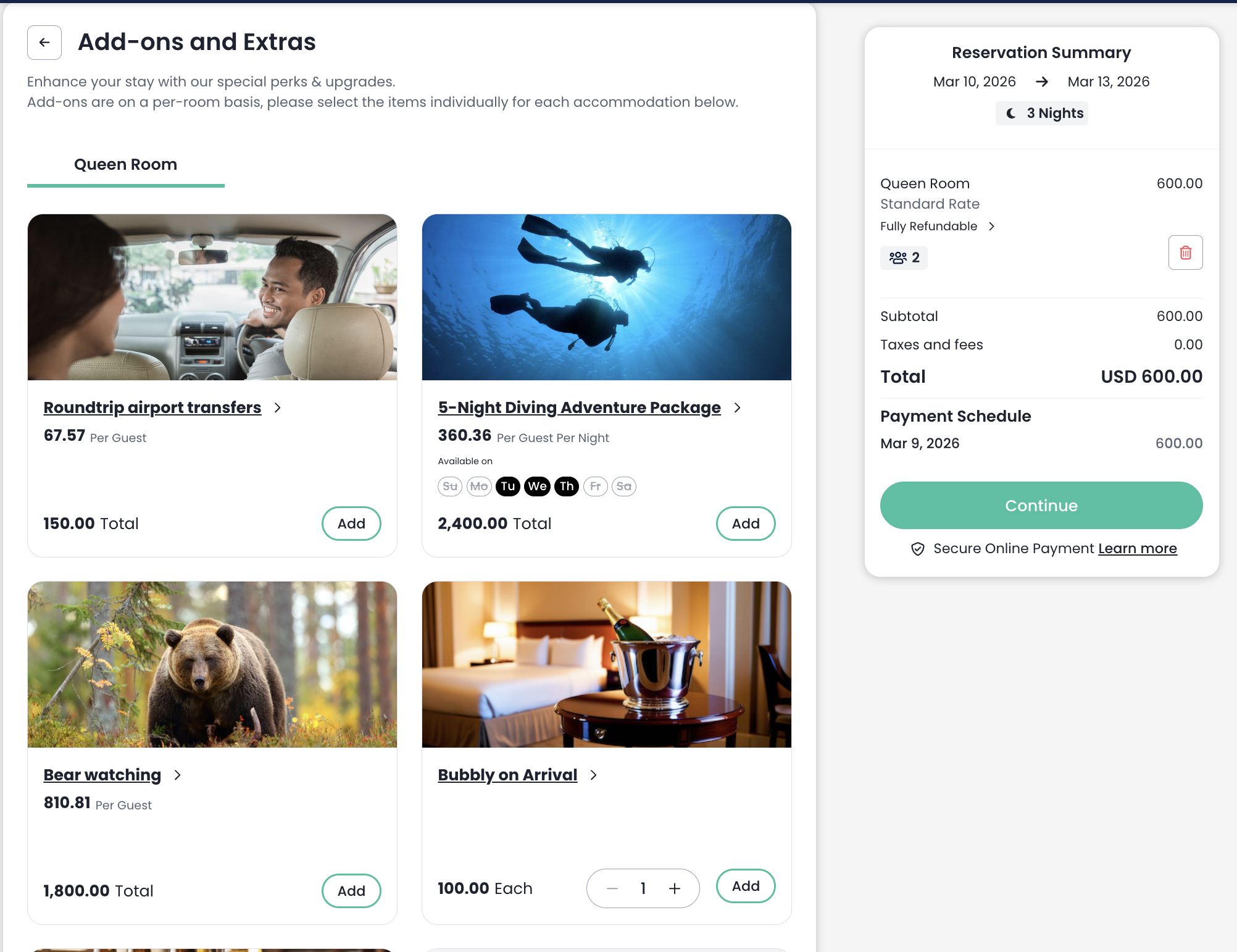
What are the extras you provide on request that you might want to track? Sell early check-ins, extra beds or little touches like flowers and champagne 🥂—then assign housekeeping to work their magic. Every room shines, every guest smiles. 🎉

Screenshot 2026-02-13 at 12.29.49 PM

Food and beverage

Planniac isn't a POS, but you might find some use for coordinating certain F&B activities. Like a champagne setup in the room on arrival day. Or a birthday cake for a special guest. If you're a very small property, you could use Planniac to manage meal or room service orders.

Screenshot 2026-02-13 at 12.29.49 PM

Gift shop

Your hotel might regularly offer services or products that logically fall under the gift shop umbrella. Try offering your branded coffee mugs or beach towels on the upsell site and see if you can get guests to buy them instead of stealing them.

Screenshot 2026-02-13 at 12.29.49 PM

Events

Set up one-time events or repeated ones with capacity limitations. View attendees and manage changes or cancellations. Use it for events like a weekly yoga class, New Years Eve party or a tennis tournament.

Screenshot 2026-02-13 at 12.29.49 PM

Flights

Assist guests with local flights and record them on Planniac to keep track of them.

Screenshot 2026-02-13 at 12.29.49 PM

Taxi/shuttle

Getting guests to and fro takes some coordination skills! If you have your own shuttle, complimentary or not, you'll be able to keep drivers and guests informed real-time.

Create and market packages

Packages in Planniac make coordination a bit simpler. You can schedule a single package, or sell it online, and when it comes in to Planniac it will split into the separate elements for follow-up and itinerary purposes.

Screenshot 2026-02-13 at 12.29.49 PM

Set up packages to include meal plans and activities

Planniac is really flexible, so you can include whatever you'd like in your packages. If "Kayak with grizzlies" and "60-minute Relaxation Massage" go together, then bundle them together.

Screenshot 2026-02-13 at 12.29.49 PM

Offer them on your PMS and your Planniac upsell page

Give your guests the option to purchase a package wherever you interact with them. Planniac helps you keep the included activities well organized.

Screenshot 2026-02-13 at 12.29.49 PM

Link packages from your website to specific Cloudbeds rate plans

We can give your webmaster some reference code so you can create customized 'Book package' buttons that take a looker right to those rate plans on your booking engine


Share itineraries

Untitled (650 x 650 px) (4)

Preview and send from Planniac

At any time after a guest reserves, you can send an itinerary of their scheduled or pending activities.

Screenshot 2026-02-13 at 12.29.49 PM

Give guests real-time updates

The itinerary you send will stay updated anytime your staff make changes to an activity.

Screenshot 2026-02-13 at 12.29.49 PM

Share specifics – not horrifics

The itinerary can let the guest know when and where to report, what to wear, what to bring, and what's included. You can set these defaults for every activity ahead of time, and avoid a lot of repetitive work.

Screenshot 2026-02-13 at 12.29.49 PM

Send a link with your scheduled Cloudbeds emails

Why not engage guests right from the start? Insert a custom link that reveals their personal itinerary right in the confirmation email (or a future email if that makes more sense to you).


Maximize upsells

Screenshot 2026-02-14 at 1.32.06 PM

Link Cloudbeds add-ons

When a reservation is made, use Cloudbeds to upsell your most easy-to-sell add-ons. Things like meal plans, room extras, early check-in and transfers sell well here. You can 

Screenshot 2026-01-28 at 12.36.33 PM

Post a branded upsell page of your own

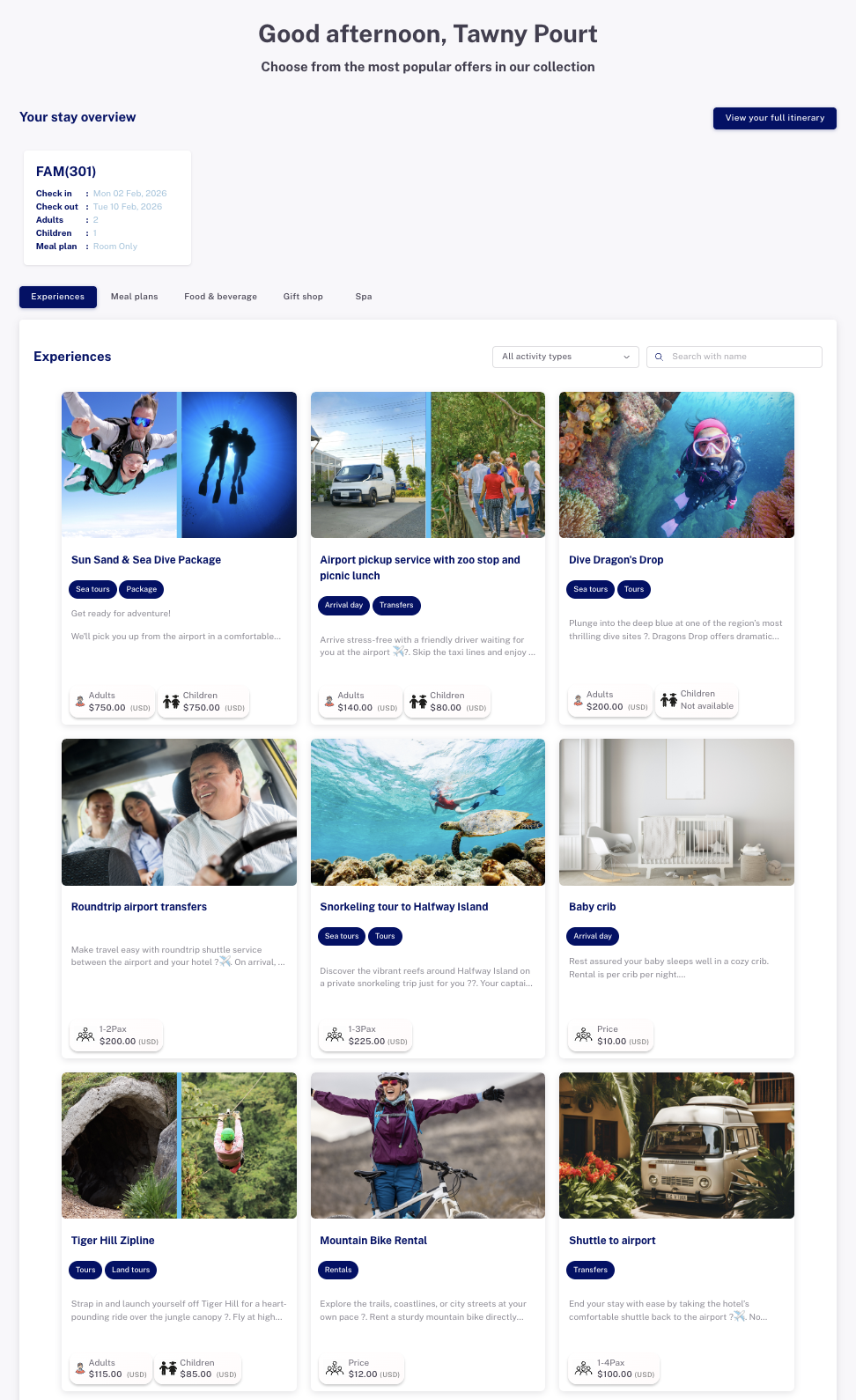
The Planniac system gives you access to an online offers site which you can use on its own, or embed in your own website or CRM tool. Of course, it's mobile friendly. Choose to collect payment via your own Stripe account, or simply take requests to charge later using your preferred method.


Facilitate check in with Planniac's online pre-registration option

Use Planniac's optional pre-registration tool to collect extra information before guests arrive. Choose the questions to ask and make them optional or mandatory. 

Screenshot 2026-02-13 at 12.29.49 PM

Accurate

Guests tend to be more accurate when they do it themselves, and it gives you some great information to serve them even better on arrival.

sandboxsuites

Branded

You'll have a small logo on the form and a large greeting that you can customize. Help guests feel at home before they even get on the plane.

Screenshot 2026-02-13 at 12.29.49 PM

Allergy awareness

Knowing a guest's allergies in advance helps your team in a lot of ways. The restaurant is the most obvious. But what about those feather pillows or aromatics in the spa? Planniac helps you track them – and use them.


Monitor internal tasks

Tasks are usually used for things that aren't activities planned for guests. We know some brilliant hotels using Planniac and we've borrowed a few tasks tips from them. See if any of these would make sense for your property.

Untitled (650 x 650 px) (7)

Reservations

Reminders to: Charge card (manual charge reminder) / Planning call / Post-stay thank you call

Untitled (650 x 650 px) (7)

Front desk

VIP arrival / Message for guest / Keys at desk / Luggage store / Follow-up

Untitled (650 x 650 px) (7)

Driver

Pick up supplies / Staff ride / Clean vehicle

Untitled (650 x 650 px) (7)

Housekeeping

This one's easy. Special assignments might be: Deep clean room / Guest reported bugs / Laundry pickup / Extra blanket

Untitled (650 x 650 px) (7)

Kitchen

Birthday cake / Late arrival order / Large group reservation / Special menu request

Untitled (650 x 650 px) (7)

Restaurant FOH

Large group reservation / VIP guest / Guest birthday / Romantic dinner setup

Untitled (650 x 650 px) (7)

Maintenance

ASAP TV or remote / ASAP assist guest with safe / AC not cooling / Plumbing issue

Untitled (650 x 650 px) (7)

Security

Guest reported missing item / Monitor noise


Tools and reports that support operations and capitalize on Planniac's data

Every property operates differently. We know that. So we've built a number of tools that help Planniac hotels manage different aspects of day-to-day operations.

Untitled (650 x 650 px) (8)

Daily report

A daily recap of all guest comings and goings.

Untitled (650 x 650 px) (8)

In-house guests report

A list of current guests with basic reservation information and open balances

Untitled (650 x 650 px) (10)

Trip manager (tours & transfers)

Use this tool to schedule drivers, guides and vehicles. Focus on upcoming tour & transfers activities.

Untitled (650 x 650 px) (10)

Housekeeping supervisor worksheet

Assign housekeepers. Add supervisor notes. Read housekeeping notes from the PMS. Check that housekeepers have completed all assigned cleaning and tasks for the day, including empty rooms.

Untitled (650 x 650 px) (10)

Kitchen tasks

See in-house guest totals for planning and prep. Know guest allergies. Use a checklist for pack meals (tour lunches) needed for the day.

Untitled (650 x 650 px) (8)

Restaurant FOH report

This is a simple list of all guest names, their meal plan entitlements, and potential allergy concerns. Put it on the same devices as the restaurant POS and eliminate charges being billed to the wrong guest.

Untitled (650 x 650 px) (10)

Spa manager

See upcoming spa activities, including guest names, staff (or outside resource) names, treatment requested and treatment room assigned.

Untitled (650 x 650 px) (10)

Events manager

Create dates for your events. Monitor attendee lists and payment status. Adjust for date or venue changes.

Untitled (650 x 650 px) (8)

House accounts report

See pending activities with open balances for outside guests.

Untitled (650 x 650 px) (8)

Export planns

Filter by date range, room, guest name, provider and more – and print reports that will make even your bookkeeper happy.